How it worksx, accounted for
Follow one finding from found to accounted for.
One x, followed through ColossalX: found, held, tested, fixed and accounted for, landing in one queue, one register, one score and one evidence store.
Many sources · one issue: red-team run found calling one issue (got through); code scan found calling one issue; audit finding found calling one issue; one issue to re-test (fix approved); re-test to closed (passes).
In short
How work flows in ColossalX: a finding from testing, scanning, intelligence, audit or compliance becomes one issue with an owner, a due date and a ticket. It writes a risk-register entry, closes only when a re-test proves the fix, moves the trust score through measured evidence and files its evidence for an auditor.
Findings scatter across tools, so nobody owns them and fixes are assumed rather than proven.
ColossalX turns each finding into one owned issue that closes only when a re-test proves the fix.
One finding
One finding, five states, four records.
pricing-agent, from the day it was found to the record an auditor reads. The lanes show which record each step writes.
Records each step writes. found, Found in traffic: no spine record. held, Held for a person: no spine record. tested, Tested on purpose: Issue queue: opened, owned; Risk register: entry for ASI01; Evidence store: sealed run. fixed, Fixed, then proven: Issue queue: closed on re-test; Risk register: entry closed. accounted for, On the record: Trust score: pillar moves; Evidence store: ready for audit.
- x, found See
Found in traffic
pricing-agent called a model with no credential; now it has an owner.
- x, held Control
Held for a person
Its first high-value tool call waited for a named approver.
- x, tested Prove
Tested on purpose
An authorised run got an indirect injection through, reply quoted.
- x, fixed Prove
Fixed, then proven
A person approved the proposed guardrail; the same probes came back blocked.
- x, accounted for Govern
On the record
The issue closed on evidence; the score and the report moved.
The spine
Four records, whichever source found it.
The same four records, whether a test, a scan, an advisory or an audit raised the problem.
One issue queue
More
One issue per problem, with an owner, a due date and a ticket; it closes on a passing re-test.
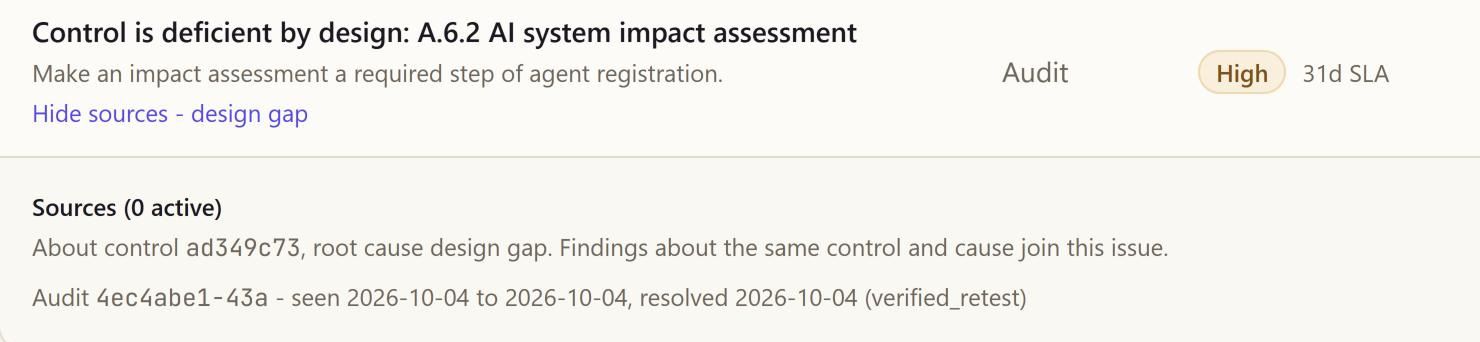
From a demo workspace 2notes
- Closed by a re-test
- Raised from an audit
One risk register
Risk quantificationMore
A proven exposure writes an entry; FAIR puts it in money, as a loss range.
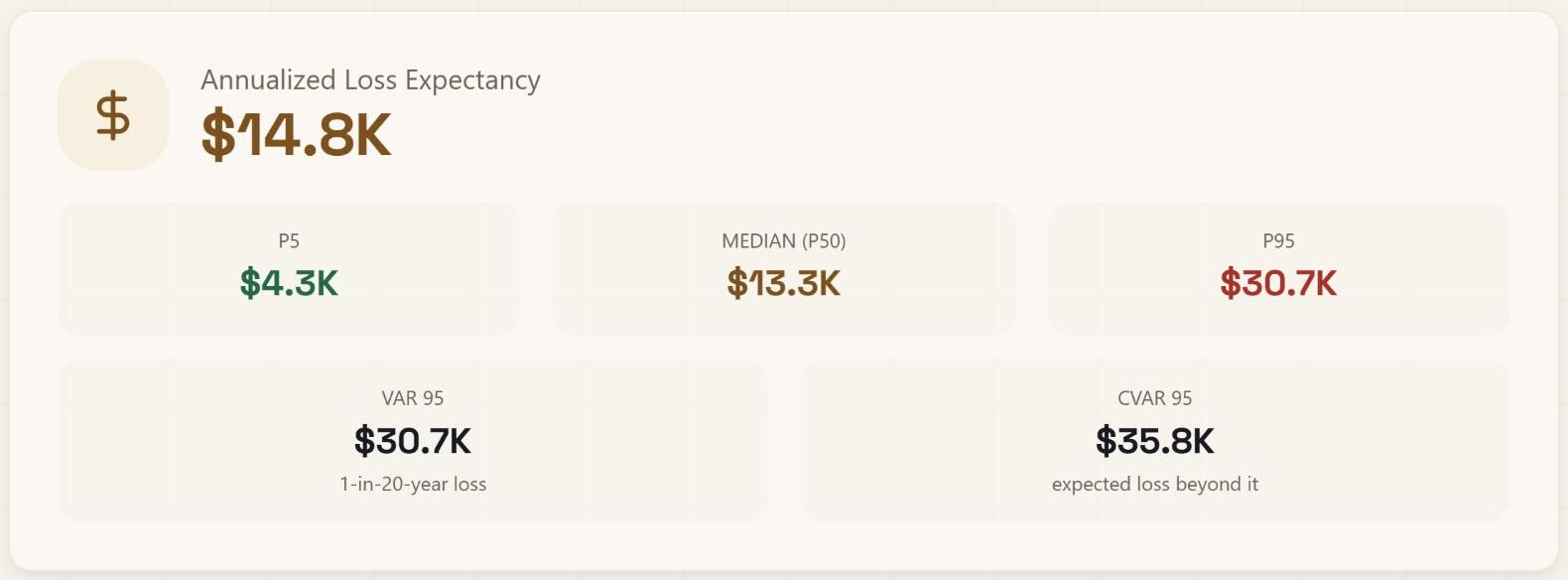
From a demo workspace 2notes
- Expected annual loss
- Loss as a range
One trust score
ColossalX Trust EngineMore
5 pillars weighted by evidence; it moves on measured tests and says what is missing.
Trust score · whyIllustrative An illustrative trust score, explained: five pillars with the evidence behind each, resilience shown as not measured rather than zero, a passing re-test that lifts the risk pillar and moves the grade (still provisional), and what would raise it next.
3notes
- Provisional while evidence is thin
- Not measured, never scored zero
- What would raise the grade
One evidence store
AuditMore
Evidence graded A to D by how it was obtained, timestamped daily and never deleted.
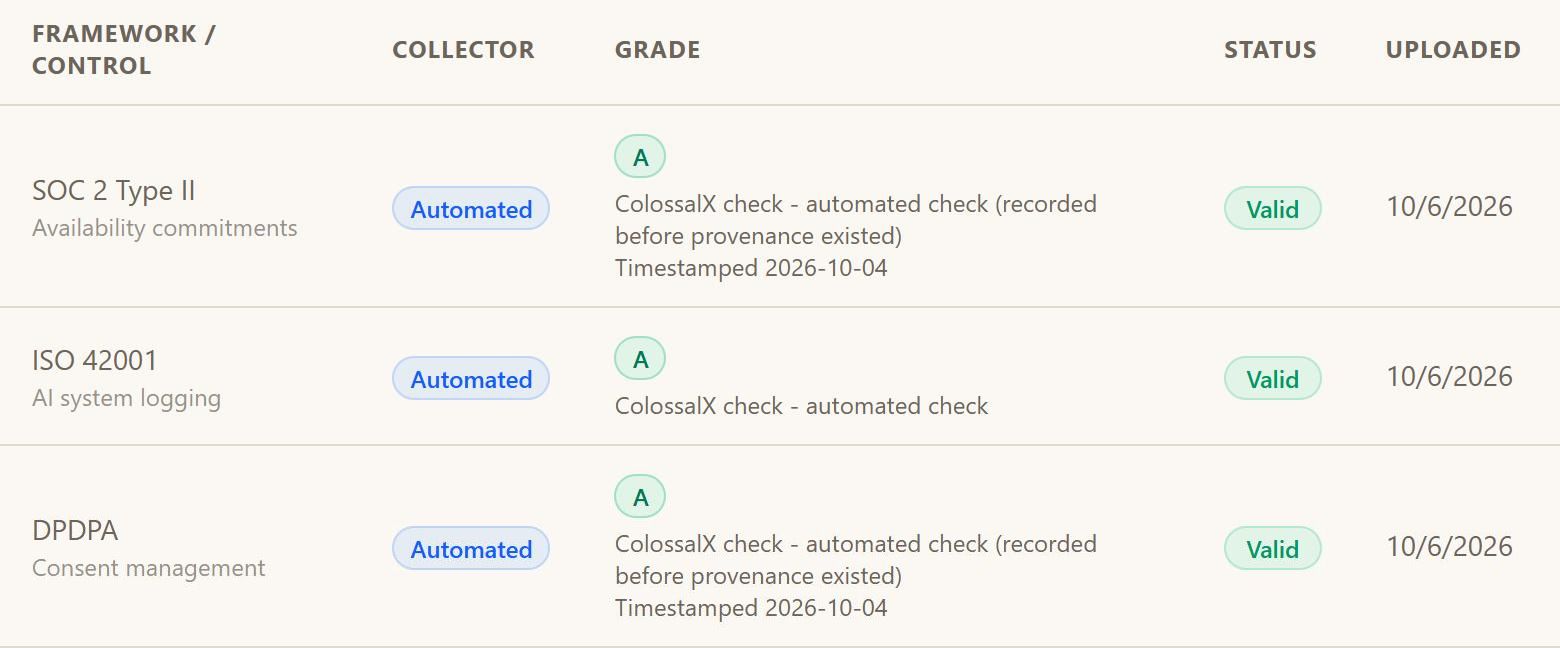
From a demo workspace 2notes
- Mapped to a control
- Graded and timestamped
Seven journeys
Seven journeys, each ending in a record.
Teams start from different questions. Each journey crosses more than one verb and ends in something you can show an auditor or a board.
In detail1
- The finding above. It walked two journeys: prove your defences hold, then know where you stand.
Seven journeys · where they end: Secure what you build ends in Owned ticket; Know which threats matter ends in Recorded decision; Prove defences hold ends in Sealed run; See the AI in use ends in Standing rule; Know where you stand ends in Live posture; Stay audit-ready ends in Timestamped archive; Guard each call ends in Block or hold.
Who decides
People decide; the spine runs on its own.
Records move continuously, with nobody clicking. Where judgement matters, the step waits for a named person, and the record keeps who and why.
In detail2
- Runs on its own. Issues opened from findings, tickets raised, passing re-tests closing issues, evidence collected, risks synced out.
- Waits for a person. Approval holds, guardrail changes, risk acceptances above appetite and report sign-off.
Detection loop · a proposed fix: detection loop to guardrail profile, "Block the injection pattern from the missed probes.". Checks: Proposed from missed probes passed, Revert ready passed, Named approver waiting. Verdict: held, Waits for a person.
Honest by design
What the spine does not do yet.
The spine · what feeds it today: Opens issues tests, scans, intel, audit, compliance; Not yet issues runtime blocks, shadow AI; Closes issues a passing re-test; Moves the score measured evidence. Stated, not implied.
x, not measured
Runtime detections are alerted and recorded, but they do not yet open issues in the queue.
All 4 limits
- Shadow AI findings raise alerts and standing rules; they do not yet open an issue.
- The trust score moves on measured tests and evidence, not on a closed ticket.
- Tickets need your ticketing tool connected; risks sync outbound only, never back in.
Questions
Questions buyers ask
What happens to a finding after it is found?
It becomes one issue in the queue, with an owner, a due date graded by severity and a ticket in the tool that will close it. A proven exposure also writes a risk-register entry for that agent and that risk. When a fix is approved, the same probes are re-sent, and the issue closes only if the attack no longer gets through.
When does an issue close?
Only on positive evidence. For a finding from testing, that means a later run proves the attack no longer works; for an audit finding, a newer effective test of the control. That is why a fix is re-tested before the issue closes, and the re-test is kept, so an auditor can re-perform it.
Which ticketing and GRC tools does work sync to?
Issues raise tickets in Jira, ServiceNow, Zendesk, Freshservice, GitHub and GitLab once your team connects one. Risks sync outbound to GRC, ticketing and third-party risk tools; nothing is pulled back in. Alerts go to email, signed webhooks and your SIEM.
What are the seven journeys?
Secure what you build, know which threats touch you, prove your defences hold, see the AI in use, know where you stand, stay audit-ready and guard each request. Each starts from a question a team asks and ends in a record: an owned ticket, a recorded decision, a sealed run, a standing rule, live posture, a timestamped archive or a block.
Does a blocked request become an issue?
Not yet. A request the gateway refuses is recorded with its reason, sends an alert to email, webhook or SIEM, and raises an incident and a ticket; the risk register and the security pillar of the trust score both see it. It does not open an issue in the one queue today, and we say so rather than imply it.
What does the first-day checklist cover?
A guided first-day checklist walks all four verbs in linked steps, from single sign-on at the start to evidence at the end. Each step links to the page where that work is done. It is a guided checklist rather than an automated setup, so nothing changes in your estate until your team acts on a step.
Next step
Follow your own x.
Bring one real finding to the walkthrough, and watch where it lands: queue, register, score and evidence.
- 01Bring one real finding
- 02Watch where it lands
- 03Decide where to start