SeeAI bill of materialsx, found
AI bill of materials: what your AI is built from.
An AI bill of materials for each repository, with the AI kept apart from ordinary libraries and drift caught against an approved baseline.
One repository, two lists: payments-service to scan (manifests); scan to AI parts (kept apart); scan to libraries; scan found calling refunds-agent (registered); AI parts to baseline.
In shortAI-BOMAI-BOM, or AI bill of materials, lists the AI components inside a piece of software: models, AI SDKs, agent frameworks, orchestration and MCP libraries, each with its version. It extends the software bill of materials so AI parts are tracked like any other dependency, and a change from an approved baseline can be noticed. In the glossary
An AI bill of materials in ColossalX lists what each repository is built from, with AI SDKs, agent frameworks, orchestration and MCP libraries kept apart from ordinary software. It exports as CycloneDX or SPDX, matches AI libraries against known threats, and compares each new scan with an approved baseline, so drift raises an alert the day it appears.
An agent framework inside a payments service picks up a version with known flaws, and nobody notices.
ColossalX lists it in the AI-BOM, matches it to known threats and alerts when it drifts.
How it works
From a push to an owner, when a library drifts.
One push changes an MCP library inside a repository that already has an approved baseline. Followed from the scan to the agent built from that code.
01 Pushed and scanned
A push triggers a scan; AI parts are listed apart from libraries.
02 Compared to baseline
One MCP library no longer matches the approved baseline.
03 Matched to threats
The new version is checked against threat profiles and advisories.
04 Agent told
The agent registered from that repository gets an update advisory.
What you see
The AI inventory, listed apart from the libraries.
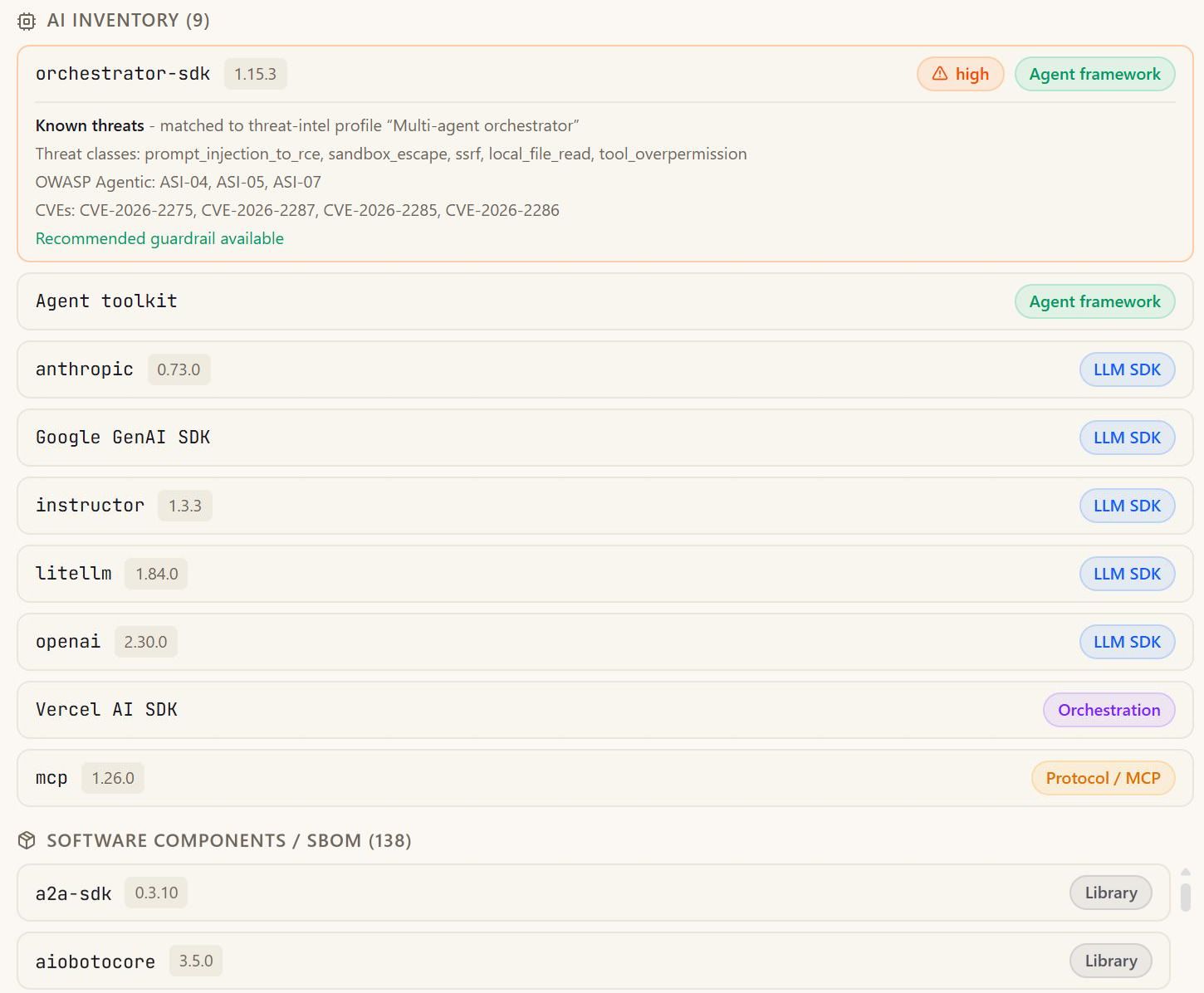
Each bill splits AI components by kind, flags those matching a threat profile, and lists ordinary libraries below, exportable as CycloneDX or SPDX.
- Built from real versions
- AI kept apart
- Matched to known threats
- Drift from a baseline
Read the detail, step by step4
- Built from real versions. Manifests and lockfiles are read, so component versions are the real ones. Public repositories need only a name. Private ones use a connected source-control token. The same scan finds secrets, risky dependencies and unsafe code for code security.
- AI kept apart. Agent frameworks, orchestration, MCP and LLM SDKs are listed apart from libraries. Agents found in a repository are listed with the bill, so each can be registered, monitored and given a threat brief built from its own code.
- Matched to known threats. An AI library matching a threat profile shows CVEs and a guardrail. A match names its threat classes, its OWASP Agentic references and its CVEs. The threat gate advises by default; blocking on it is your choice.
- Drift from a baseline. Approve a baseline; a later change raises an alert and an incident. Pinning shows what changed since approval. It does not prove who published a component. Until a baseline is approved, a later scan cannot be said to have drifted.
3notes
- AI parts, listed apart
- Threat profile matched
- Libraries, listed below
How it connectsx, found
Where a listed component goes next.
A bill of materials is a starting point. Each AI component is watched, matched and tied to the agent built from it.
Versioned AI components are re-checked against public advisories each day, and a person decides.
Agents found in a repository are registered, monitored and given a threat brief.
The same scan finds secrets, risky dependencies and unsafe code, and gates the pipeline.
Findings become owned work, a ticket in your tool and a risk entry that syncs out.
Honest by design
What it does, and what it does not.
Drift from baseline: Approved baseline: "mcp-client 1.4.0"; This scan: "mcp-client 1.5.0". Matches baseline: yes to no. Verdict: monitored, Alert and incident raised.
What it does not do
x, not measured
A baseline pins versions and shows what changed; it does not prove who published a component.
All 4 limits
- The threat gate advises by default; failing a build on it is a setting you choose.
- Model weights have no curated advisory source; model intelligence enters only by import.
- Self-managed Git servers are built but not yet proven against a real account.
How we know
- Component versions come from manifests and lockfiles, so they are the versions that ship.
- Drift from an approved baseline raises an alert and an incident, mapped to OWASP ASI04.
- An AI library matched to a threat profile names its CVEs and a recommended guardrail.
- ColossalX hands procurement its own SBOM and AI-BOM in CycloneDX 1.6, on request.
Questions
Questions buyers ask
What is an AI bill of materials?
An AI bill of materials, or AI-BOM, lists the AI a piece of software is built from: the LLM SDKs, agent frameworks, orchestration and MCP libraries it imports, with their versions. It answers what an inventory cannot: not which agents run, but what each one depends on, so a flaw in one library can be traced to the agents it affects.
What is the difference between an AI-BOM and an SBOM?
An SBOM lists every software component in a product. An AI-BOM picks out the parts that carry AI risk, such as agent frameworks, model SDKs and MCP libraries, so they can be matched to AI-specific threats. ColossalX produces both from one scan and keeps the AI components apart from the ordinary libraries.
Which formats does ColossalX export?
Each bill of materials exports as CycloneDX or SPDX, the two common formats for software bills of materials, so it can travel into the tools your security and procurement teams already use. Exports carry the component versions read from the repository's manifests and lockfiles.
How does drift from an approved baseline get flagged?
You approve one scan of a repository as its baseline, which pins its components. Each later scan is compared with it, and any change raises an alert and an incident, mapped to the OWASP Agentic supply-chain risk. Pinning shows what changed since approval; it does not prove who published a component.
Can we get ColossalX's own SBOM and AI-BOM for a vendor review?
Yes. On request, procurement and security reviewers receive the SBOM and AI-BOM of ColossalX itself in CycloneDX 1.6: the libraries, containers, models and external services it uses, with a statement, checked by the build, that no model is bundled or run locally.
Related
Where to look next.
-
AI inventory and agent map
Agents from code and traffic, on one map
-
Code security
Repositories, apps and the CI/CD gate
-
Threat intelligence
Matched to what you actually run
Next step
Know your x.
See the AI-BOM of one of your own repositories: what it is built from, what is known about it, and what drifted.
- 01Tell us what you run
- 02See the four verbs on it
- 03Decide where to start